How to Manage Your GST Account Online
Struggling with tax compliance? Learn How to Manage Your GST Account Online efficiently with these expert tips from CA4Filings. Simplify your business.
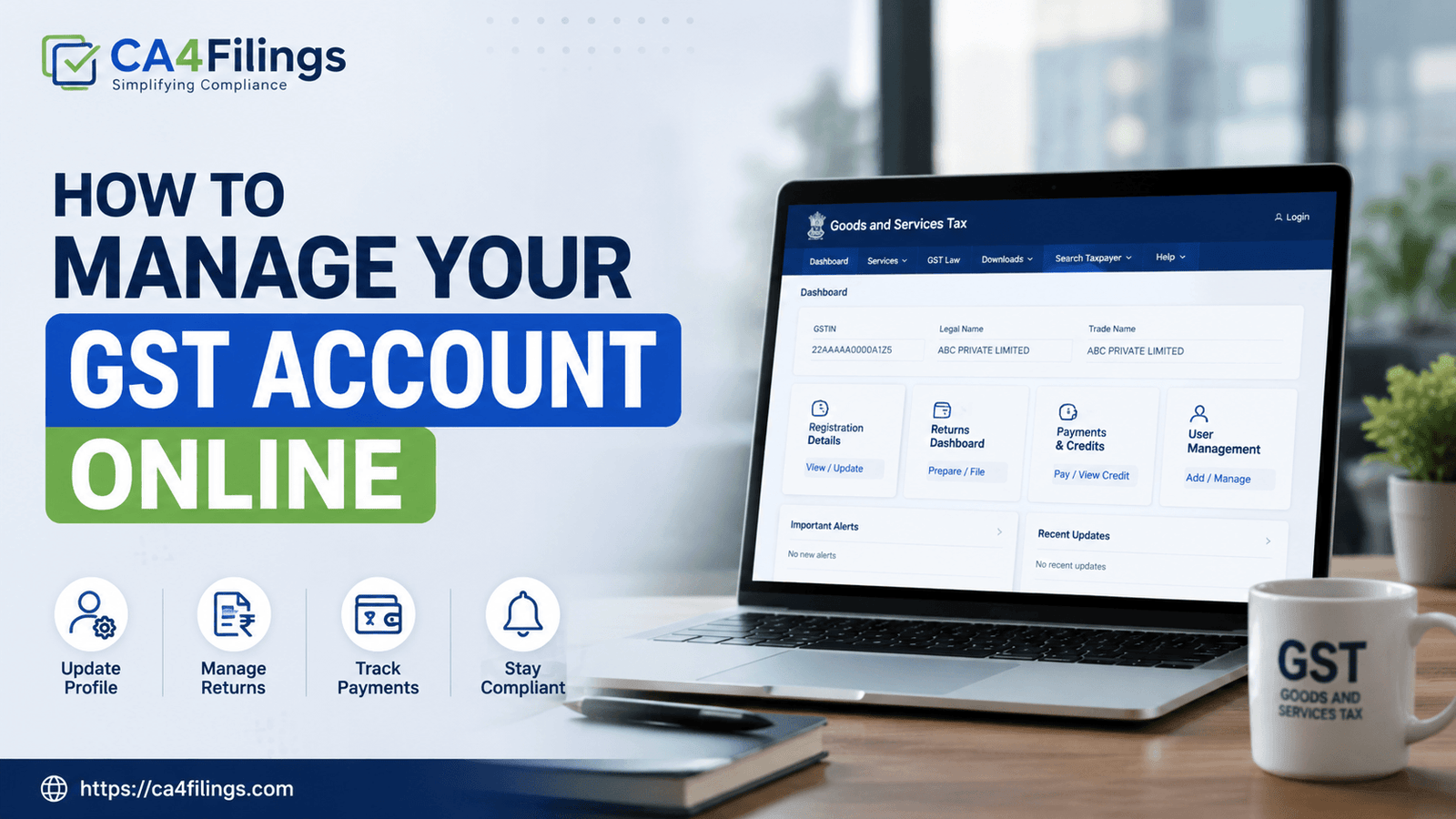
Running a business in India today involves a lot of moving parts, and let’s be honest, tax compliance is often the most stressful one. If you have already completed your GST Registration with us, you know that getting the certificate is just the beginning of the journey. The real challenge—and the key to avoiding heavy penalties—lies in the day-to-day operations. Many of our clients ask us, "How to Manage Your GST Account Online" without getting lost in the technical jargon of the GST portal.
Managing your GST account effectively is not just about filing returns on time; it is about keeping your records clean, reconciling your input tax credit, and staying audit-ready. In this guide, we will break down the complexities of the portal into simple, actionable steps that any business owner can follow.
Why Efficient GST Management Matters
Before diving into the "how," let’s talk about the "why." Your GST account is the digital window through which the tax authorities view your business health. If your data is inconsistent, you risk notices, blocked input tax credit (ITC), and unnecessary cash flow hurdles. Learning How to Manage Your GST Account Online empowers you to take control of your compliance calendar and ensures you aren't paying more tax than you absolutely have to.
Steps to Effectively Manage Your GST Account Online
Navigating the GST portal (gst.gov.in) can feel overwhelming, but once you understand the layout, it becomes much easier. Here is how you can stay on top of your game.
1. Master Your Dashboard
The dashboard is your command center. When you log in, prioritize checking your "Notifications" and "Latest Updates" sections. The government frequently updates rules or extends deadlines; ignoring these can lead to missed compliance dates.
2. Timely Filing of GSTR-1 and GSTR-3B
These are the two pillars of your GST compliance.
GSTR-1: This contains the details of your outward supplies (sales). Ensure that your invoices are uploaded accurately.
GSTR-3B: This is your self-declared summary return. Expert tip: Never wait until the last day. Servers often get overloaded, and a simple technical glitch could lead to late fees.
3. Reconciliation: The Secret to Saving Tax
One of the most important aspects of learning How to Manage Your GST Account Online is mastering GSTR-2B reconciliation. You must match the input tax credit appearing in your portal with your actual purchase invoices. If your vendor hasn't filed their returns, you won't get the credit. Use the "View/Download" feature to pull your GSTR-2B data regularly and match it with your purchase ledger.
Practical Tips for Small Business Owners
As Chartered Accountants, we see many business owners make the same small mistakes. Here is how you can avoid them:
Maintain a Digital Folder: Even though everything is online, keep a backup of your filed returns and GSTR-1/3B summary reports in a dedicated folder.
Keep Your Contact Info Updated: Ensure that the email and phone number registered on the portal are active. This is where OTPs for filing and crucial government alerts are sent.
Review Your Ledger: Periodically check your "Electronic Cash Ledger" and "Electronic Liability Ledger" on the portal. This helps you track how much tax you have already paid versus what is pending.
Troubleshooting Common Portal Issues
Sometimes, the portal might show an error or a mismatch. Do not panic. Most issues can be resolved by:
Clearing your browser cache.
Checking the "Services" tab for the specific module (e.g., Returns, Payments, or Refunds).
Using the "Help" section or "Raise a Ticket" feature if you encounter a persistent technical bug.
If you find yourself stuck, remember that How to Manage Your GST Account Online is a skill that improves with practice. However, if the issue involves legal interpretation or complex tax adjustments, it is always safer to consult a professional.
Frequently Asked Questions
Is it mandatory to check my GST portal daily?
No, it is not mandatory to check it daily. However, checking it once a week or at least before the filing deadlines is highly recommended to stay updated.
What should I do if I missed a GST filing deadline?
If you miss a deadline, file your return as soon as possible. While late fees and interest will apply, delaying it further only compounds the penalties and affects your compliance rating.
Can I manage multiple GSTINs under one login?
Yes, you can link multiple GSTINs to a single user ID by using the "Add/Remove Authorized Signatory" feature in your profile settings.
How do I track my ITC status?
You can track your ITC status by accessing the "Returns" dashboard and downloading the GSTR-2B report for the relevant period.
Does CA4Filings help with ongoing account management?
Yes, we provide end-to-end GST compliance services, from routine filing to audit support, ensuring you never have to worry about the complexities of the portal.
Take Control of Your Compliance Today
Managing your taxes doesn't have to be a headache. By following these steps on How to Manage Your GST Account Online, you can save time, avoid penalties, and focus on what you do best—growing your business.
At CA4Filings, we believe in empowering our clients. If you feel that your business has outgrown your ability to manage taxes alone, or if you simply want the peace of mind that comes with expert oversight, our team is here for you. We provide personalized GST advisory, reconciliation services, and seamless filing support. Reach out to us today and let us handle the paperwork while you build your future.
Latest Updates
ca4filings.com Services























-registration.png)